



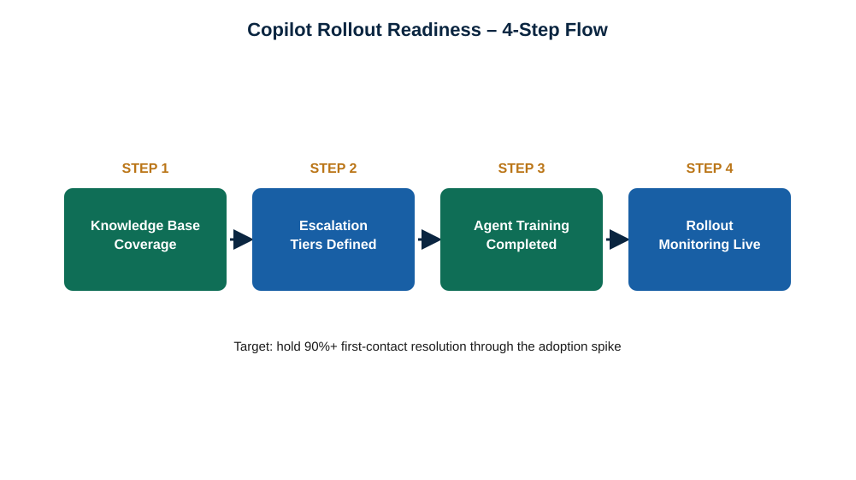
Build readiness before rollout, not after. A team that maps knowledge base content to real Copilot questions, defines a two-tier escalation path, trains agents on Copilot workflows inside Teams, Outlook, and SharePoint, and monitors ticket patterns daily can hold first-contact resolution above 90% through the rollout spike – the same standard Inspiro applies across its outsourced IT support services for technology and SaaS clients.
How do you prepare an IT service desk for a Microsoft Copilot rollout?
Microsoft 365 Copilot has moved from pilot to default deployment faster than almost any enterprise software in recent memory. More than 20 million paid Copilot seats are now active, over 90% of the Fortune 500 use the platform, and Microsoft has reported a fourfold year-over-year increase in customers running deployments above 50,000 seats. For IT leaders, that adoption curve is arriving as a support problem before it fully lands as a productivity story.
Copilot is a Microsoft 365 productivity layer, not a service desk. It drafts, summarizes, and surfaces context inside the apps people already use – but it doesn’t reset a password, provision a license, or own a ticket’s lifecycle on its own. Every rollout wave generates a predictable spike in a different kind of ticket: licensing confusion, integration questions, and “how do I get this to work” requests that land on the service desk right as the team is also trying to drive adoption.
That spike is manageable when it’s planned for. Rollout benchmarking from Microsoft implementation partners puts a well-prepared organization’s Copilot-related ticket volume at roughly five tickets per 100 licensed users per week during active rollout – a number that climbs quickly wherever the readiness work was skipped.
Four gaps show up in almost every under-prepared rollout: knowledge base content that doesn’t yet cover Copilot-specific questions, escalation tiers that route routine licensing issues to senior engineers instead of Tier 1, agents who haven’t been trained on Copilot workflows inside Teams, Outlook, and SharePoint specifically, and no feedback loop turning repeat questions into new knowledge base articles before the next wave of users hits the same wall.
Cross-industry, the first-contact resolution (FCR) benchmark sits around 70%, and research from SQM Group shows only about 5% of support organizations reach a “world-class” 80%+. Inspiro’s Copilot-ready service desk model is built to clear that bar by a wide margin, holding first-contact resolution above 90% through the weeks when ticket volume and user frustration both peak.
That performance comes from treating the rollout as a managed program rather than a wave to absorb: Copilot knowledge base content mapped to the questions users actually ask, a two-tier escalation model that keeps routine access and licensing questions off Tier 2 engineers, agents trained specifically on Copilot inside the Microsoft 365 apps, and daily ticket-pattern monitoring that feeds new content back into Tier 1 before the same question resurfaces in the next department’s rollout.
For CIOs weighing whether to staff Copilot support internally or bring in a managed partner, the calculation is straightforward: a team that hasn’t built this readiness in advance will absorb the ticket spike by borrowing time from the innovation work Copilot was deployed to enable in the first place. That’s the calculation driving more IT Directors to evaluate outsourced IT support services rather than build Copilot readiness from a standing start.
Enterprise Rigor, Without the Overhead
Inspiro works with Fortune 1000 companies across the US, APAC, and ANZ to deliver contact center outcomes that show up in real numbers. Unlike mega-BPO providers, Inspiro’s right-sized model means senior practitioners stay close to your operation, making faster decisions and delivering custom-fit solutions without the bureaucratic drag. That same enterprise-grade discipline extends into Inspiro’s Business Process Services (BPS), where structured process improvement drives efficiency across back-office functions like finance, HR, and compliance. BPS and CX aren’t separate offerings. They’re built to work together, so improvements in back-office accuracy and throughput directly strengthen front-office performance. For organizations managing complex operations across multiple geographies, this integrated model delivers measurable value at every layer of the business. If your CX operation needs that level of rigor without the overhead, let’s talk specifics.
